Tracker.ru
Uptime Monitoring

Find out about site downtime.
Before your users.

Real-time website and API availability monitoring. Instant Telegram notifications on failures.
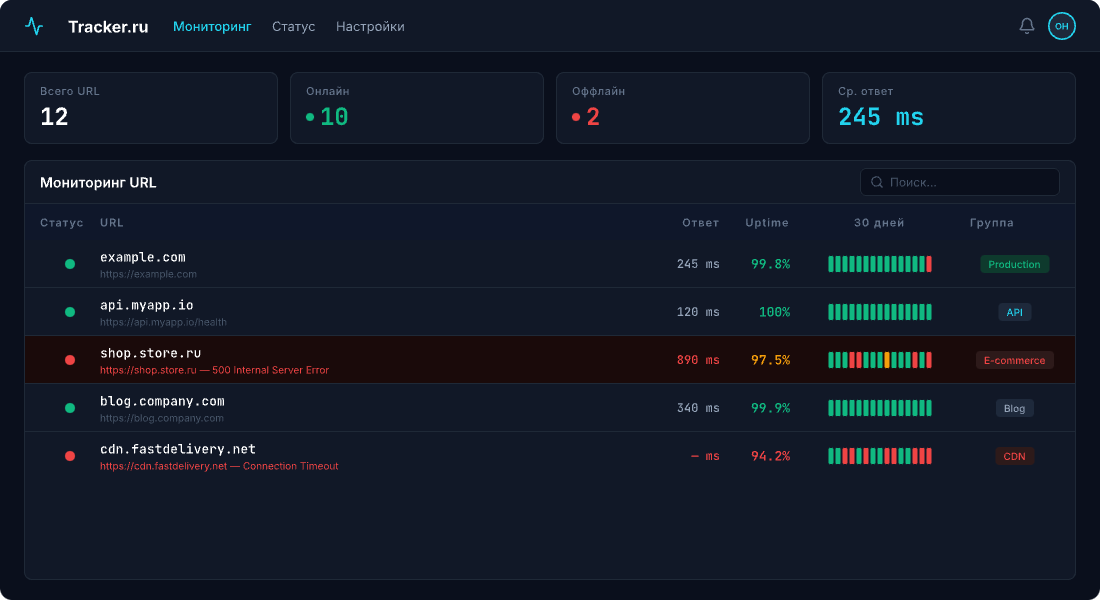
Dashboard Preview

What is website monitoring?

Website monitoring is an automated check of a URL or API at a fixed interval. Tracker.ru sends an HTTP request and notifies you instantly if the site is down, responds slowly, or the SSL certificate is about to expire.

Everything for uptime peace of mind

Monitor websites, APIs and services with precision and get instant notifications on failures

Real-time Monitoring

Website checks from every 30 seconds to 1 hour. Instant problem detection.

Telegram Notifications

Instant alerts on site downtime or recovery.

MAX Notifications

Alerts via the Russian MAX messenger by VK. Runs alongside Telegram, free on every plan.

Performance Metrics

Track response times and trends. Detect slowdowns early.

SSL Monitoring

Track SSL certificate expiration. Alerts before expiry.

Email Notifications

Detailed incident and recovery reports delivered to your inbox.

Webhook Integration

HTTP POST with HMAC-SHA256 signatures for custom integrations.

Heartbeat Monitoring

Track cron jobs and background processes. Alert on missed pings. Details — /features/heartbeat-monitoring.

Public Status Pages

Keep users informed about service health with a public status page.

landing.features.regions.title

landing.features.regions.description

Visual Monitoring

Scheduled screenshots compared pixel-by-pixel — spot broken layouts even when HTTP returns 200.

TCP port monitoring

Port availability checks: SSH, MySQL, PostgreSQL, Redis, MongoDB, SMTP, RabbitMQ — 16 presets. Learn more — /docs/features/tcp-monitoring.

Keyword check

Searches a keyword in the HTML response: anti-deface, SLO for feature flags, layout integrity at HTTP 200. Learn more — /docs/features/keyword-check.

Maintenance windows

Suppress alerts during scheduled maintenance: one-time, daily, weekly, monthly windows. Learn more — /docs/features/maintenance-windows.

Response-time waterfall

HTTP check time broken down by phase: DNS, TCP connect, TLS handshake, and TTFB. See exactly where your site loses milliseconds. Learn more — /docs/features/response-time-breakdown.

Which notification channels are supported?

Tracker.ru notifies you in four ways: Telegram (a native bot with groups and DMs), MAX (DM only), Email, and Webhook signed with HMAC-SHA256. Telegram, MAX and Email are available on every plan including Free; Webhook is on Basic and Pro.

Start monitoring in 3 steps

1

Add URL

Enter your website or API address. Set check frequency from 30 seconds to 1 hour.

2

Connect Telegram

Link your Telegram account for instant notifications. One-click OAuth.

3

Stay informed

Get instant alerts on downtime. Track history and performance.

How often does tracker.ru check my site?

Tracker.ru checks your site at intervals from 30 seconds to 1 hour depending on the plan: Free — every 5 minutes, Basic — from 1 minute, Pro — from 30 seconds. The interval is configured per URL.

How does tracker.ru compare to UptimeRobot?

Tracker.ru is a Russian service: ruble billing, Russian-language support, Moscow as the primary region. Minimum check interval is 30 seconds vs 1 minute on UptimeRobot, with a native Telegram bot and heartbeat included in the subscription.

Feature Tracker.ru Others
Min check interval from 30 seconds from 1 minute
Telegram notifications Native integration Via third-party services
Heartbeat monitoring Included Paid or unavailable
Signed webhooks HMAC-SHA256 Unsigned or unavailable
Public status pages Included Paid

How do I monitor cron jobs?

Cron jobs are monitored via heartbeat: after a successful run the script calls GET https://hb.tracker.ru/ping/{token}, and if the ping does not arrive in time you get an alert. Free — 1 monitor, Basic — 5, Pro — 20.

How do I set up monitoring from Russia, Europe and Kazakhstan?

Tracker.ru checks each URL from Moscow, Frankfurt and Almaty — three independent workers on different providers. Free includes 1 region, Basic — 2 of your choice, Pro — all three. Downtime is counted only when every enabled region sees the error. Details on /features/multi-region.

How do I enable notifications in MAX messenger?

MAX is a Russian messenger by VK, supported as a notification channel (DM only, group chats are not supported yet). Open dashboard → Notifications → MAX, click "Connect", enter the code from the bot — and down/recovery alerts will be sent to MAX alongside Telegram.

How do I avoid notification spam when a site flaps?

Tracker.ru prevents spam with three mechanisms: a 5-min anti-flap cooldown between identical alerts, a dedup window for rapid down→up→down flaps, and a failure threshold (alert_after_failures) requiring N consecutive failed checks before the first alert. All three on every plan.

How much does monitoring cost?

Tracker.ru is subscription-based: Free — 0 ₽, Basic — 290 ₽/mo, Pro — 790 ₽/mo. Each plan has a fixed limit of websites and check frequency — no pay-per-check and no hidden fees.

Free

For personal projects

Free
  • 5 websites
  • Check every 5 min
  • Email + Telegram notifications
  • 7 days history
  • 1 heartbeat monitors
Start

Basic

For small business

290₽ /mo
  • 20 websites
  • Check every 1 min
  • Email + Telegram notifications
  • 30 days history
  • Webhook notifications
  • 5 heartbeat monitors
  • Up to 2 screenshot monitors
  • 10 screenshots per monitor
Start Trial

Pricing FAQ

Common questions about plans and payment

There is a free plan (5 websites, checks every 5 minutes, 1 region). Paid subscriptions: Basic — 290 ₽/month (20 websites, checks from 1 minute), Pro — 790 ₽/month (100 websites, checks from 30 seconds). Fixed pricing, no hidden fees.

For a single website, Free is enough — 5 URLs and checks every 5 minutes from one region. If you need more frequent checks (from 1 minute), webhook notifications, and 30-day history — Basic for 290 ₽/month. Pro makes sense when you have multiple websites and need checks from 30 seconds.

The plan is fixed. You pay a monthly subscription — the number of checks is unlimited and not billed separately. The free plan also has no hidden charges.

Yes, you can change your plan in the dashboard under "Billing" at any time. New limits (number of websites, regions, check frequency) apply immediately.

Yes. Free includes 5 websites with checks every 5 minutes from one region, 1 heartbeat monitor, Telegram and Email notifications, and 7-day history. No credit card required, no time limit.

Currently only individuals are supported. For legal entities, please email support@tracker.ru — we will discuss it individually.

Yes, depending on the plan: Free — 1 region (Moscow), Basic — 2 regions, Pro — 5. Each URL can be checked from all available regions simultaneously. The list of active regions is on the /docs page.

Free — 1 monitor, Basic — 5, Pro — 20. Heartbeat is included in the subscription, no extra charge.

Yes, on the Pro plan. Once configured, your status page is available at an address like https://status.example.com instead of tracker.ru/status/{token}. Setup uses a CNAME record (or ALIAS/A for the root domain) and a TXT record for ownership verification. The SSL certificate is issued automatically via Let's Encrypt — usually within 1–5 minutes after successful DNS verification. The original tracker.ru/status/{token} URL keeps working in parallel — the migration is seamless. Details and DNS instructions — at /docs/features/status-page-custom-domain.

Frequently Asked Questions

Minimum check interval is 30 seconds, maximum is 1 hour. Frequency depends on your plan. Free plan checks every 5 minutes.

Instant notifications via Telegram, MAX, Email, and Webhooks. You'll receive an alert within seconds of detecting an issue.

Heartbeat monitoring tracks recurring tasks (cron jobs, backups, queues). Your service sends periodic pings to https://hb.tracker.ru/ping/{token}, and if a ping is missed — you get notified. Tracker.ru ships ready-made integrations with cron, systemd, GitHub Actions, and Laravel scheduler — quickstart snippets are at /docs/features/heartbeat-monitoring.

Yes! You can create a public status page for your users. It shows current status and uptime history for your selected services.

Yes, via Webhook integration. When a site's status changes, an HTTP POST request with HMAC-SHA256 signature is sent to your specified URL.

There's a free plan for personal projects. Paid plans start from 290₽/month and include more sites, frequent checks, and advanced features.

Tracker.ru checks each site simultaneously from three countries: Moscow (Russia), Frankfurt (Germany, EU) and Almaty (Kazakhstan). Each region is an independent worker on a different network provider, so when one region reports an error while the other two return 200 OK, the issue is most likely local and doesn't warrant a midnight escalation. Region availability depends on the plan: Free — 1 region (Moscow by default), Basic — 2 of your choice, Pro — all three at once. We don't have probes in the US, China or Australia — for global geography use international services. Details on /features/multi-region.

An anti-flap cooldown of 5 minutes applies between identical notifications for the same URL: after the first alert, the next one for that site won't arrive sooner than 5 minutes later. A dedup window also waits for the status to stabilize: if a site quickly bounces down→up→down, you receive a single notification instead of a series. Both mechanisms are enabled by default on every plan.

Yes. If a site stays down for more than a few minutes, Tracker.ru sends periodic reminders so the incident isn't forgotten in the background. Reminders use the same channels as the main alert (Telegram, MAX, Email, Webhook) and stop automatically once the site recovers.

Yes. Each URL has an "alert after N consecutive failures" setting (alert_after_failures): you can require, say, 3 failed checks in a row before Tracker.ru sends an alert. This is especially useful with short check intervals — it cuts down noise from one-off timeouts.

Tracker.ru is a cron monitoring service via heartbeat: your cron job calls https://hb.tracker.ru/ping/{token} after a successful run, and if the ping does not arrive in time — Tracker.ru sends a missed-cron alert via Telegram, MAX, Email and Webhook. Ready-made quickstart snippets for cron, systemd, GitHub Actions, and Laravel scheduler are at /features/heartbeat-monitoring and /docs/features/heartbeat-monitoring. Heartbeat is included in every plan (Free gives 1 monitor) — no extra charge.

Tracker.ru sends SSL certificate expiry alerts 30, 14 and 7 days before the expiry date via Telegram, MAX, Email and Webhook (HMAC-SHA256). Each threshold triggers an alert only once per certificate — no repeats. When the certificate is renewed, you get a separate confirmation and the cycle resets, so a new alert series starts 30 days before the new expiry date. SSL alerts can be disabled per URL — toggle in /my/urls/{id}. Details — at /docs/features/ssl-expiring-alert.

Ready to never miss a single downtime?

Start monitoring your websites for free.

Start Monitoring

No credit card • Free plan